

Sports Club Payment App: Collect Fees and Subs on Time
Parents pay membership fees and subs by card through Stripe. Medalyst reminds families before each deadline and shows the club who has paid and what is still due.
100 sports clubs and 23,000 athletes already use Medalyst.
See the club’s finances for yourself
This is the Medalyst web app with sample data. Change a payment status or switch to received payments, and watch the totals update.
Finances stripe ✓
admin@riversidefc.clubMembership fees and other products
| Product name | Amount | Recurring | Assigned | Created |
|---|---|---|---|---|
| U12 membership fee | €35 | Monthly | 18 athletes | 01/08/2026 |
| U14 membership fee | €40 | Monthly | 21 athletes | 01/08/2026 |
| U17 membership fee | €45 | Monthly | 16 athletes | 01/08/2026 |
| Autumn tournament entry | €60 | One-off | 18 athletes | 05/09/2026 |
Transactions
| Athlete | Name of transaction | Amount | Payment deadline | Status | Date paid |
|---|---|---|---|---|---|
| Oliver Bennett | U12 membership fee | €35 | 10/09/2026 | 08/09/2026 | |
| Oliver Bennett | Autumn tournament entry | €60 | 30/09/2026 | ||
| Amelia Clarke | U14 membership fee | €40 | 10/09/2026 | 01/09/2026 | |
| Noah Fitzgerald | U17 membership fee | €45 | 10/09/2026 | 09/09/2026 | |
| Isla Murphy | U14 membership fee | €40 | 10/09/2026 | ||
| Liam Walsh | U12 membership fee | €35 | 10/09/2026 | 12/09/2026 | |
| Ella Byrne | U14 membership fee | €40 | 10/09/2026 |
Sample club and data. The layout matches the Medalyst web app. Open the full demo club to try every section.
How can a sports club collect membership fees on time?
Set each fee up once and let the app follow it through. In Medalyst, the administrator creates a membership fee or a one-off payment, assigns it to a team or to individual athletes, and parents pay by card through Stripe. Medalyst sends a reminder before each deadline.
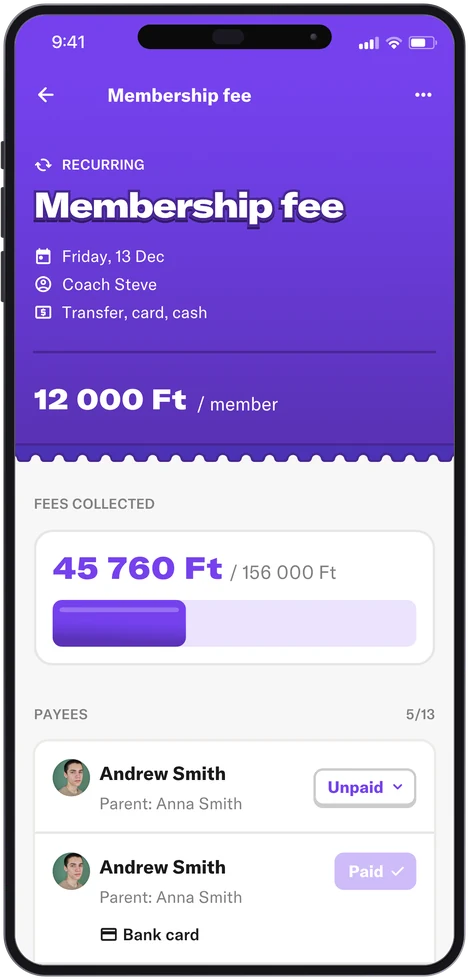
Cash and bank transfers are recorded in the same place, so the club always has a complete picture: the amount assigned, the amount paid and what is still due.
What the finances screen shows
Fees and products
Membership fees and one-off payments, monthly or single, assigned to teams or individual athletes.
Card payments
Parents pay in the app by card through Stripe, and the payment is recorded automatically.
Automatic reminders
Medalyst reminds families before each deadline, so the chasing is done for you.
Every payment method
Cash and bank transfers are marked in the same list, next to card payments.
Club totals
The amount assigned, the amount paid and the total still due, filtered by item, team or status.
Export
Export the transactions in one click for your treasurer.
Each athlete’s fees also appear on their profile. Work out how much more your club could collect on time.
How clubs collect fees with Medalyst
- Create the fees. Set up a membership fee or a one-off payment, choose monthly or one-off, and assign it to a team or to individual athletes.
- Parents pay by card. Each family sees what is due in the mobile app and pays through Stripe.
- Reminders go out automatically. Medalyst reminds families before each deadline.
- Record cash and transfers. Mark other payments in the same list, so the record stays complete.
- Follow the totals. See what is assigned, paid and still due, and export it for your treasurer.
The core features of the mobile app are free. Download it from the App Store or Google Play.


Plans and pricing
Membership fee management is part of every Medalyst plan, including the free plan for clubs with up to 150 users. The pricing page shows the card payment fee for each plan, and the finance export comes with the Pro and Elite plans.
See every plan or work out what Medalyst is worth to your club.
Membership fees: frequently asked questions
Create the fee in Medalyst and assign it to a team or to individual athletes. Parents pay by card through Stripe in the mobile app, and Medalyst records the payment automatically.
Yes. Medalyst reminds families about fees that are coming due, so the club’s volunteers can leave the chasing to the app.
Yes. Each fee can be marked as paid by cash, bank card or transfer, so every payment sits in one list.
Yes. The finances screen shows the amount assigned, the amount paid and the total still due, and each athlete’s profile shows their own fees.
Yes. A fee can be assigned to a whole team or to individual athletes, as a monthly fee or a one-off payment such as a tournament entry.
Yes. The transactions export in one click, ready for your treasurer.
Yes. Membership fees are part of every Medalyst plan, including the free plan for clubs with up to 150 users. Fees sit alongside member records, attendance and messaging.
See membership fees set up for your club
Tell us about your club and we’ll show you how your fees would run in Medalyst. A free demo, quick setup, and you decide afterwards.

100 sports clubs and 23,000 athletes already use Medalyst